Mermaid diagrams as shared agreements: how to align Claude on your workflows

You've spent hours creating a repeatable workflow together with Claude, only to discover none of it is working.
You want continuous support from your thinking partner (Claude), so you carefully describe the process you need. Claude confirms, you both proceed, and a week later when you try to run it, nothing works the way you imagined. Debugging is a nightmare because there are no logs, no clear view of what went wrong, and what started as an aligned conversation now has you doubting the whole setup.
A bit more work up front, creating a visual map of your workflow, saves you from this chaos and gives you and Claude a shared agreement you can both reference.
- Give Me 2 Hours and You'll Have Your Own Leadership OS Running in Claude
- How to turn Claude from a yes-agent into a strategic partner that pushes back, without changing a single prompt
Subscribe to follow this series.👇🏻
Text lets misalignment stay hidden, diagrams force it into the open
Text-based agreements make you think you've aligned when you haven't.
You write out the workflow, scan it, assume the important parts are clear and move on. A diagram forces you to make explicit choices before you proceed: you can't draw a box without deciding what goes in it, you can't connect two steps without thinking through the flow between them, and you can't map sequence without exposing gaps in logic. The misalignment surfaces while you're drawing, not three weeks later when nothing works.
This is why designers have always worked visually, and the challenge with AI collaboration has been finding a diagramming approach that works for both of you.
Mermaid diagram are faster than having claude create images, and both of you can edit them
Yes, AI can generate diagrams as images, and AI can view images you create. But Mermaid scripts are faster.
Claude generates the diagram code in seconds, you review the visual output, and if you need changes either of you can edit the text that produces it. No uploading, no regenerating entire images, no back-and-forth describing what box should move where. You both work with the same artifact, you both modify it directly, and you're working at the speed of text instead of waiting for image generation.
I've found this to be the fastest way to create visual working artifacts together with AI.
My article workflow created with Claude in Mermaid script
Here is my article creation workflow, designed to produce quality faster as I refine it over time
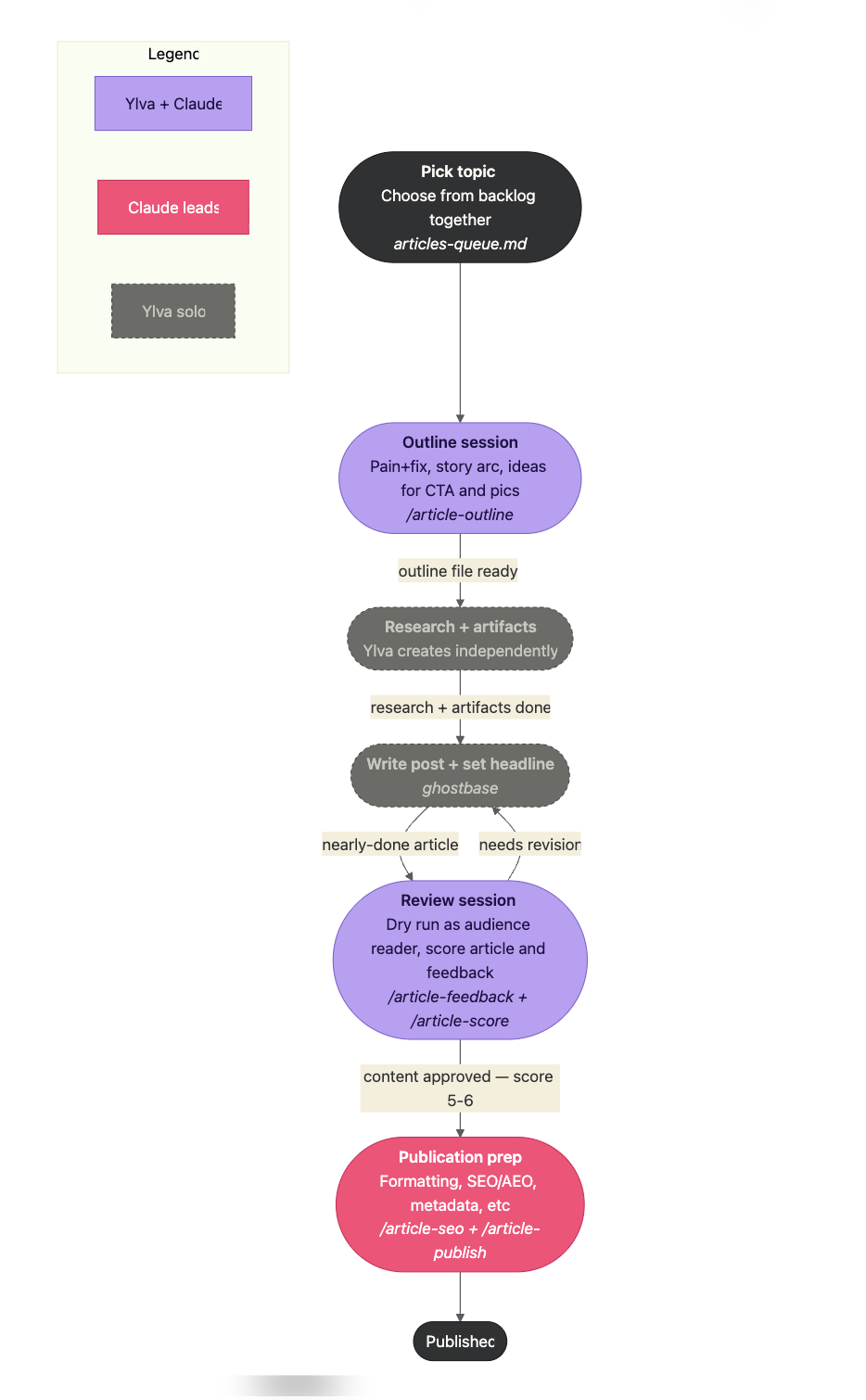
It's one of my core weekly workflows, it has high impact, and it's supporting a skill I'm actively building. Each box in the diagram is paired with details on what artifacts go in and out, any Claude skills I'll use (Create a skill using this article) plus bullets (kept in the same file depicting the workflow) for what happens in that step. Creating this overview has truly helped me:
- Think through and break down a multi-day workflow into clear steps
- Decide and set expectations on what Claude and I do together versus what I "own"
- Troubleshoot and isolate what's not working (outlines! because their quality dictates everything downstream)
- Sequence my agent building, identify what part to complete before moving to the next
I'm using it for any complex work that I'm tackling over time, especially skills and flows that I'm learning about and are not second nature to me yet.
Map your own workflow with this prompt
Pick a workflow you already run with or around Claude. (I use Claude Code for this and view the diagrams in Obsidian.)
Claude will ask questions to understand your workflow, then generate a markdown file with the visual diagram at the top and bullet explanations for each step below. You paste the prompt, describe your workflow however it comes to mind, and Claude handles the structure.
Once you have your first workflow mapped, you'll notice gaps you couldn't see before.
# Mermaid workflow diagram prompt
This diagram will live in a markdown file rendered in a tool that supports Mermaid (such as Obsidian, Notion, or a markdown editor). Wrap all diagram output in a ```mermaid` code block.
## Your role
Help me create a Mermaid workflow diagram. First understand my workflow through conversation, then build the diagram once you have a clear picture.
## Step 1 — Understand the workflow
Ask me to describe my workflow. It doesn't need to be structured — I might just have it in my head. Draw it out through follow-up questions until you understand:
- The steps in order
- Who owns each step — human, AI, a tool, or a combination
- Any branches or loops (review cycles, rejection paths, conditions that gate the next step)
**Don't ask all of these at once.** Have the conversation, summarize back what you've understood, and confirm with me before generating anything.
## Step 2 — Build the diagram
### Structure
- Use `flowchart TD` by default; switch to `LR` if the workflow has parallel tracks or needs a horizontal layout
- Open with an `%%{init}%%` block for global theming — set background, node color, border color, text color, edge label background, and font
- Write each node with **bold for the step name** and _italic for any tool, file, or command reference_, inside `[" "]` syntax
- Put handoff conditions on edge labels (`"approved"`, `"needs revision"`) — not just plain arrows
- Show loops explicitly — if a step can send work backward, draw that arrow
- Add a `subgraph Legend` that uses the same `classDef` styles as the flow nodes
### Color and style
- Define a `classDef` for each role — at minimum: human solo, collaborative, AI or tool-led, and start/end anchors
- Apply solid borders to active steps and dashed borders (`stroke-dasharray`) to async or independent work
- Keep the palette small — 3 to 4 colors, each meaning exactly one thing
### File structure
If I want the diagram in a full markdown doc, structure the file as:
- Diagram at the top as the overview
- A `##` section below for each step with a few bullets each
Let me know how it goes!
This is part of a series on building your leadership OS in Claude Code. Get the next one in your inbox by signing up for my newsletter.👇🏻